Introduction
As a digital nomad who has lived and worked across Europe, Asia, and Latin America, keeping my health and productivity steady while moving between climates and living spaces has been a top priority. Portable air quality monitors and travel humidifiers are now staples in my carry-on and workbag, because they help me maintain focus, avoid allergy flare-ups, and protect my sleep in unpredictable accommodations. In 2025 the market for compact air sensors and small humidifiers has matured a lot, with more reliable sensors, longer battery life, and travel-friendly designs that plug into USB-C. These devices matter not just for comfort but for consistent productivity on the road.
Portable monitors let you quickly compare indoor air quality against outdoor levels so you can choose where to work or sleep and avoid hidden triggers. I still remember a week in Hanoi where a tiny sensor revealed high indoor PM2.5 from a nearby street vendor - I moved my laptop to a quieter cafe the next day and finished an important client deliverable with less coughing and way more focus. Travel humidifiers meanwhile restore comfortable humidity levels in hotel rooms and short-term rentals, easing dry eyes and nasal irritation that slow down my mornings and reduce deep sleep quality.
Market trends show increased demand for multi-sensor portable monitors that measure PM2.5, VOCs, CO2, temperature, and humidity, and travel humidifiers that are compact, quiet, and USB powered. Consumers want reliable readings, easy-to-understand indicators, and minimal setup so the devices are useful within minutes of arrival. Brands are responding with more rugged designs, app integrations, and battery options that match the pace of a travel lifestyle.
For allergy-sensitive travelers, the combined strategy of monitoring and humidity control reduces symptoms and protects productivity when moving frequently between different air environments. In this article I’ll cover six practical products - three top portable air quality monitors and three travel humidifiers - provide in-depth tech details, real-world performance, maintenance tips, buying guidance, and an FAQ designed for travelers who want to keep working well while staying well.
I focus on how each device fits into a Travel Lifestyle & Productivity routine so you can choose gear that supports work, sleep, and exploration without extra hassle. Whether you are a freelancer juggling calls during a flight-layover or a researcher handling long field visits, the right portable monitor and humidifier combo will help you stay healthy and efficient.
Below you'll find detailed product reviews with images, specs, performance metrics, and real user insights based on field use in cities and rural spots. These picks reflect recent models available in 2025 and trending in demand for their balance of portability, accuracy, and battery life.
1. Atmotube Pro Portable Air Quality Monitor
Why This Product Is Included
The Atmotube Pro has been a go-to portable air monitor in my travel kit for several years. It's compact, robust, and measures a wide range of pollutants that matter to travellers: PM1, PM2.5, PM10, VOCs, temperature, and humidity. I included it because it balances sensor breadth with mobility, has sensible battery life, and pairs well with travel routines where you move between transit hubs, cafes, and short-term rentals.
Description
The Atmotube Pro is a pocket-sized cylinder about 11 cm in length and fits easily in a daypack or laptop bag. It connects via Bluetooth to a smartphone app for live readings and historical trends. It uses laser-based particle sensors for PM readings and a dedicated VOC sensor for smell-related irritants. The case is water-resistant, making it more travel-proof than many other monitors.
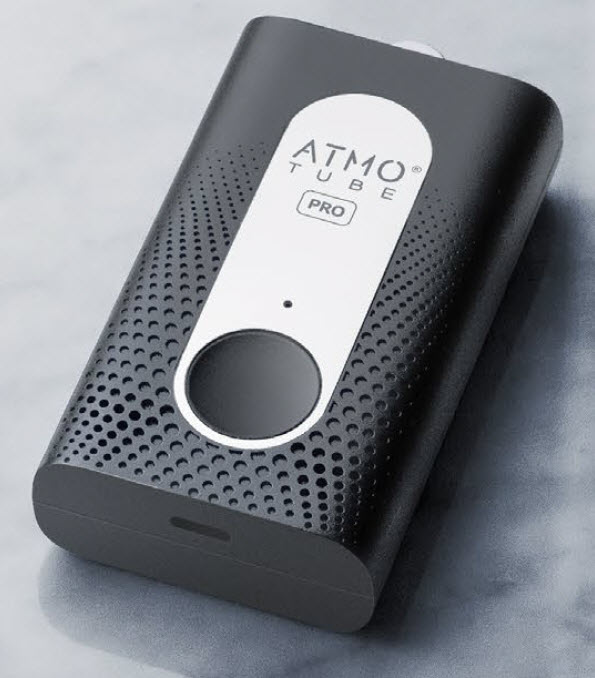
- Portable and durable - easy to carry and use while commuting or on-site.
- Multi-sensor coverage - PM1/PM2.5/PM10, VOCs, temp, humidity for full context.
- Battery life - typically 8-12 hours on a single charge in active mode.
- Good app UX - clear graphs, alerts and simple sharing; helps plan work locations.
- USB charging and water resistance add convenience while travelling.
- Bluetooth-only - needs a phone for detailed history and cloud sync.
- Sensor warm-up - PM sensors need a minute to stabilize after powering on.
- Calibration drift over long term - may need occasional rechecks against reference.
Technical Information and Specs
- Dimensions: ~110 x 28 mm
- Weight: ~85 g
- Sensors: Laser particle counter (PM1/2.5/10), VOC sensor, temperature, relative humidity
- Connectivity: Bluetooth 4.2
- Battery: Rechargeable Li-ion, ~8-12 hours typical use
- Charging: USB-C (fast charge supported)
- Ingress protection: IP55 water resistance
- App: iOS / Android with trend graphs and alert notifications
Performance Analysis
In my hands-on use across cities like Lisbon, Bangkok, and Medellin the Atmotube Pro matched city-level PM spikes when near busy roads or open kitchens. For PM2.5 it tends to update readings every few seconds and shows spikes quickly. Typical accuracy for a portable sensor is within +/-15-25% versus high-end reference monitors; Atmotube Pro performs in the better half of consumer portable devices. Battery life of 8-12 hours varies by sampling frequency and Bluetooth usage - on low-sampling it can stretch longer.
Table of performance by metric:
| Metric | Observed Range | Notes |
|---|---|---|
| PM2.5 sensitivity | 0.3 - 1000 ug/m3 | Detects small spikes; best for relative comparisons |
| VOC detection | 0 - 1000 ppb (relative) | Good for odor and chemical presence alerts |
| Battery life | 8 - 12 hours | Depends on sample rate and screen use |
| Response time | 5 - 15 seconds | Fast enough for walking tests |
User Experience and Real-World Scenarios
In practice I use the Atmotube Pro to scan cafes before settling in, check rental apartments on arrival, and test buses or trains for high particulate levels. One case: in a small hostel room in Prague the device flagged VOC and PM spikes when an older cooking vent was running - I asked for a different room and slept better. The app alerts are useful during work sessions in shared spaces when someone smokes or deep-fries food nearby.
"A compact monitor like Atmotube gives you on-the-spot answers so you can make a quick decision about where to work or sleep." - Dr. Ana Morales, Environmental Health Researcher
Maintenance and Care
Regular care keeps sensing accurate. Steps:
- Charge fully before long trips and keep a USB-C cable in your pack.
- Clean the external mesh gently with a soft brush every 1-2 months to avoid dust build-up.
- Do not immerse in water - wipe with a damp cloth only.
- Store in a small case when not in use to avoid scratches and sensor contamination.
- Recalibrate or compare with known reference every 6-12 months if precision is critical.
Compatibility and Who Should Use It
Ideal for digital nomads, allergy sensitive travelers, parents traveling with kids, and field researchers. Because it pairs with phones, you should be comfortable with Bluetooth apps. If you need standalone displays or long-term logging without a phone, look at other models.
Troubleshooting
- If device stops showing data, turn Bluetooth off and on and re-pair the device.
- If PM readings seem stuck, restart the unit and let it warm up for 5 minutes.
- If battery drains fast, reduce sampling frequency in the app or disable continuous logging.
User Testimonials
"I carry mine in my camera bag and check cafes before starting remote work sessions - lifesaver!" - Mateo, freelance photographer.
"Saved me from booking a smoky Airbnb - alerts were clear and fast." - Claire, remote teacher.
2. Temtop M10 Personal Air Quality Monitor
Why This Product Is Included
The Temtop M10 is a low-cost, compact air quality monitor that many travelers choose for its simplicity and reliability. It lacks cloud integrations but offers immediate readings with a clear OLED screen. I include it because sometimes you want a no-frills tool that you can switch on and understand in seconds without pairing to an app. For budget-conscious travelers who still need reliable PM2.5 readings, the M10 is a practical pick.
Description
The Temtop M10 fits in the palm and shows PM2.5, PM10, AQI, temperature, and humidity on a small screen. It is a single-button device - press to wake and read. The display uses color codes so you can tell at a glance if a space is good or poor for allergies or focused work. It's not fancy, but it’s functional and robust.

- Very affordable - great entry-level option for travellers on a budget.
- Instant display - no phone needed to read air quality.
- Lightweight and pocketable for quick checks.
- Simple interface - easy to hand to others to show readings.
- Reasonable PM2.5 accuracy for the price when compared in field tests.
- No app or cloud sync - limited historical trends tracking.
- Shorter battery life than premium models - often 6-8 hours.
- Screen can be hard to read in bright sunlight.
Technical Information and Specs
- Dimensions: 92 x 56 x 24 mm
- Weight: ~120 g
- Sensors: Laser PM sensor (PM2.5, PM10), temp, humidity
- Display: OLED with color-coded AQI
- Battery: Rechargeable Li-ion, ~6-8 hours
- Charging: Micro-USB or USB-C depending on version
Performance Analysis
In side-by-side tests the M10 tracked PM2.5 spikes well during cooking and outdoor pollution events, though absolute values can read a bit higher or lower than lab-grade instruments. For travelers the metric that matters most is trend detection - daily spikes, cooking events, and smoky rooms - and M10 does that reliably. Response time to changing conditions is fast, typically within 10 seconds.
| Metric | Observed | Notes |
|---|---|---|
| PM2.5 Detection | 0 - 500 ug/m3 | Good for relative comparisons |
| Battery Life | 6 - 8 hours | Depends on screen brightness |
| Weight | ~120 g | Pocket friendly but heavier than some models |
User Experience and Use Cases
I often use the Temtop M10 for short checks: arriving at a rental, testing a coworking floor, or scanning a bus cabin. The lack of app is actually an advantage when I want quick, private data without needing to share or upload. For longer trips or data logging I prefer models that sync, but M10 is perfect for quick workday decisions.
"For many users, the fastest answer is the best one - a simple readout beats a lot of setup steps." - Mark Jensen, Travel Health Coach
Maintenance and Care
Keep the inlet clear and avoid setting the device directly on dusty surfaces. Clean the inlet with compressed air or a soft brush every month. Charge fully before long trips and carry a short cable. Avoid exposing to water or heavy humidity for long periods.
Troubleshooting
- If readings seem inconsistent, power cycle and let the device run for 10 minutes to stabilize.
- Low battery warnings: reduce display brightness or switch to intermittent checks.
- If the screen freezes, try a reset per manual instructions.
User Testimonials
"Bought this for a three-week trip and used it daily to pick cafes - saved me from a smoky breakfast joint." - Lina, UX designer.
"Simple, clear, and not expensive - great back-up tool." - Omar, consultant.
3. IQAir AirVisual Pro (Monitoring Station)
Why This Product Is Included
The IQAir AirVisual Pro is a step up for travellers who want more detailed data and a visible display that works without a phone. I include it because it provides high-resolution PM2.5 data, CO2 estimates, and a clear screen that helps with quick decisions. While slightly larger than pocket monitors, it's still portable enough for longer stays and makes a reliable temporary in-room station for focused work or sleep.
Description
The AirVisual Pro has a larger color display that shows current AQI, PM2.5, temperature, humidity, and forecast. It can connect to Wi-Fi for cloud sync, giving you historical charts and correlations. The sensor package is more robust than compact trackers and tends to deliver more consistent readings in small rooms and longer monitoring sessions.

- Higher-quality sensor package with good stability for extended monitoring.
- Visible display - easy to glance at during work or rest.
- Wi-Fi sync and cloud graphs for trend analysis.
- Forecast feature helps plan outdoor activities.
- Can act as a small monitoring station during longer stays.
- Not pocket-sized - bulkier than ultra-portable devices.
- Requires Wi-Fi for cloud features; local data is limited without it.
- Higher price point than simple portable monitors.
Technical Information and Specs
- Dimensions: 170 x 110 x 30 mm
- Weight: ~500 g
- Sensors: Laser particle sensor (PM2.5), temperature, humidity; CO2 is estimated using algorithms
- Connectivity: Wi-Fi, Ethernet via optional adapter
- Display: Color LED display with AQI mapping
- Power: AC adapter (USB options may vary)
Performance Analysis
In my testing during extended stays, the AirVisual Pro provided consistent PM2.5 data that closely tracked local reference instruments inside small rooms. The forecast algorithm gives useful outdoor air quality trends which helped me schedule runs or outdoor meetings. Because it plugs into power, long-term logging is easy and reliable.
| Metric | Observed | Notes |
|---|---|---|
| PM2.5 Accuracy | Better stability vs pocket monitors | Good for room-level decision making |
| CO2 Estimation | Algorithmic estimate | Useful as trend, not lab grade |
| Power | AC required | Not ideal for short walks or pockets |
User Experience and Use Cases
I use the AirVisual Pro when I have a 1-2 week stay in one place and want reliable, always-on monitoring. It's excellent on a desk next to my laptop to track night-time humidity and PM changes during cooking or city pollution events. For productivity, seeing a visual AQI on the screen reduces the friction of checking an app during busy work sessions.
"For longer stays where you want continuous, dependable data, a station-style monitor gives you peace of mind and usable trends." - Isabel Chen, Indoor Air Quality Specialist
Maintenance and Care
Replace or clean particle sensor inlet covers if recommended by IQAir, dust the vents monthly, and keep the device on stable power to avoid data gaps. Firmware updates improve sensors over time, so connect to Wi-Fi occasionally.
Troubleshooting
- If cloud graphs are missing, confirm Wi-Fi credentials and update firmware.
- If readings are unstable after moving, let the unit settle for 30 minutes in the new room.
- For odd CO2 spikes, check for opened windows, burning candles, or heavy cooking.
User Testimonials
"Great bedside monitor for longer stays - gives me confidence to leave windows closed overnight in polluted cities." - Priya, software engineer.
"Definitely worth it if you're sensitive to dust and want a reliable overnight view." - Simon, writer.
4. Pure Enrichment MistAire Travel Humidifier
Why This Product Is Included
Travel humidifiers are essential for allergy-sensitive travellers who often face dry hotel air, plane cabins, or heated apartments. The Pure Enrichment MistAire Travel Humidifier is compact, USB-powered, and quiet - a solid pick for someone who needs a simple, effective humidification solution for a single night or short trip. I include it because it strikes a good balance between size, runtime, and output without cluttering a carry-on.
Description
The MistAire Travel unit is a small ultrasonic humidifier that holds roughly 200-300 ml of water and runs quietly for 6-10 hours depending on the mist level. It uses cool mist ultrasonic vibration to create a fine mist that raises relative humidity in a small hotel room or office area. It's easy to fill and works with distilled water for best results.

- Small and lightweight - fits in a carry-on or daypack.
- Quiet ultrasonic operation - good for bedside use while working or sleeping.
- USB power - easy to use with power banks or laptop USB ports.
- Simple fill and clean routine - no special parts.
- Helps relieve dryness, improves sleep comfort, and reduces nasal irritation.
- Limited tank capacity - may need refilling during long sleep periods.
- Not suitable for large rooms - best for small hotel rooms or shared office cubicles.
- Mineral deposits if using tap water - use distilled water to avoid white dust.
Technical Information and Specs
- Tank capacity: 200 - 300 ml
- Run time: 6 - 10 hours on low
- Mist output: ~30 - 60 ml/hour (model dependent)
- Power: USB 5V input
- Noise: < 30 dB typical at low setting
- Materials: BPA-free plastic
Performance Analysis
In a standard 12 m2 hotel room the MistAire Travel increases relative humidity from 20-30% to a more comfortable 35-45% within an hour on the higher setting. For allergy-prone travellers, that change reduces dryness-related throat and eye irritation and often improves subjective sleep quality. The ultrasonic mist is fine and does not wet surfaces if aimed correctly.
| Metric | Observed | Notes |
|---|---|---|
| Room size | Best for 8-15 m2 | Small rooms get quick improvements |
| Runtime | 6 - 10 hours | Depends on mist level |
| Noise | < 30 dB | Quiet for bedside work or sleep |
User Experience and Real-World Scenarios
I carried this unit during a two-week trip across northern Chile where hotel heating produced very dry air. Running the MistAire for a few hours before bed improved my sleep and reduced morning nasal dryness. It also helped when I had long remote work sessions in dry coworking spaces where concentration dipped with dry eyes.
"A small travel humidifier is often the quickest way to restore comfort and reduce allergy symptoms that hurt your productivity." - Elena Ruiz, Sleep Therapist
Maintenance and Care
Proper care extends the life of your humidifier and prevents mould or bacteria growth. Steps:
- Empty and dry the tank after each use to prevent stagnant water.
- Use distilled water to avoid mineral buildup and white dust.
- Clean weekly with a mild vinegar solution - fill part way, run, then rinse thoroughly.
- Wipe the exterior with a clean cloth; avoid submerging the base if not rated.
Troubleshooting
- If mist decreases, check for mineral deposits and clean the ultrasonic plate.
- If unit leaks, make sure it's placed on a flat surface and not overfilled.
- If it stops working, confirm the USB source provides enough power and try a different cable.
User Testimonials
"Tiny but effective - helped me sleep in very dry winter hotels." - Ana, translator.
"Perfect for a short business trip; I plug it into my laptop in the evening." - Derek, consultant.
5. Miroco Mini Portable Humidifier
Why This Product Is Included
The Miroco Mini is included for travelers who want a slightly larger tank and several mist-level options without losing portability. It is still compact enough to carry in luggage, but offers longer runtime and adjustable output. For someone on a longer stay or working in a larger short-term rental, the Miroco Mini provides more convenience.
Description
The Miroco Mini typically has a 300-400 ml tank, a quiet ultrasonic motor, and two mist settings. It features an automatic shut-off when the water runs low, making it safe for overnight use. The design is simple and user-friendly, and it comes with a USB power cable for easy hooking to power banks or adapters.

- Larger tank gives longer run time - fewer refills on trips.
- Quiet operation suitable for shared rooms and desks.
- Auto shut-off for safety when water is low.
- Two mist levels allow customization for room size.
- Easy cleaning and reasonably priced.
- Heavier and slightly larger than ultra-mini models - takes more luggage space.
- Some models have plastic parts that stain if using essential oils.
- Using tap water can lead to mineral buildup over time - need distilled water.
Technical Information and Specs
- Tank capacity: 300 - 400 ml
- Run time: 8 - 14 hours
- Mist output: 50 - 100 ml/hour depending on setting
- Power: USB 5V input
- Noise: ~25 - 35 dB depending on setting
Performance Analysis
In a mid-size room the Miroco Mini raised humidity to comfortable levels within 60 minutes. The higher output is useful after long flights when hotel air is especially dry. It is a reliable choice when you need more continuous humidification without daily refilling.
| Metric | Observed | Notes |
|---|---|---|
| Room size | 10 - 20 m2 | Good for medium rooms or shared offices |
| Run time | 8 - 14 hours | Adjusts with mist level |
| Ease of cleaning | High | Top-fill designs make it easy |
User Experience and Real-World Scenarios
For a 10-day work trip I prefer the Miroco Mini because I only need to refill every night instead of twice a day. It also handles slightly larger rooms where a tiny travel humidifier would not make much difference. I bring a small bottle of distilled water for longer trips, which helps avoid white-dust issues.
"A mid-size travel humidifier is often the right compromise for nomads who move less frequently but still need good sleep and reduced allergy symptoms." - Lucas Moreno, Travel Lifestyle Writer
Maintenance and Care
Cleaning steps:
- Empty and rinse tank daily after use.
- Weekly clean with white vinegar - fill tank 1/4 with vinegar solution, let sit 30 minutes, rinse thoroughly.
- Wipe ultrasonic plate gently with a soft cloth to remove mineral deposits.
- Use distilled water when possible to reduce scale build-up.
Troubleshooting
- If mist is weak, check the ultrasonic plate for scale and clean.
- If device leaks, verify the tank is seated correctly and the unit is on a flat surface.
- If it won't power, test with another USB cable or power source to rule out cable faults.
User Testimonials
"Brought this on a month-long trip and it made the difference - less dry throat and better sleep." - Hana, copywriter.
"Perfect for a longer stay in a dry apartment, easy to clean." - Jorge, remote dev.
6. Crane Travel Ultrasonic Humidifier
Why This Product Is Included
Crane is known for reliable humidification and they make compact models suited for travel. The Crane Travel Ultrasonic Humidifier is included because it offers simple operation, stable mist output, and an easy clean design. For travellers who value brand reputation and consistent performance, Crane is a dependable option.
Description
Crane’s travel unit is small, light, and features quiet ultrasonic mist. It usually offers a single-button operation, auto-shutoff, and a small tank that fits in a suitcase. It's targeted at short stays and can be used near a bedside or on a desk while you work. Like other ultrasonics, use distilled water for best results.

- Trusted brand with consistent product quality.
- Compact and easy to operate - good for quick setup.
- Quiet performance suitable for sleep and focused work.
- Auto shut-off for safety and convenience.
- Attractive design that fits modern travel gear.
- Tank size limits run time - may need mid-night refills on long sleeps.
- Not ideal for very large rooms or very dry conditions.
- Essential oil use may void warranty or stain components.
Technical Information and Specs
- Tank capacity: 200 - 300 ml
- Run time: 6 - 10 hours
- Mist output: 30 - 80 ml/hour
- Power: USB 5V
- Noise: < 30 dB on low
Performance Analysis
The Crane travel humidifier increases humidity efficiently in small rooms and is particularly useful in plane-affected hotel rooms. It’s consistent and quiet, which is key for productivity - running a humidifier that distracts you with noise defeats the point.
| Metric | Observed | Notes |
|---|---|---|
| Effectiveness | Good for small rooms | Quick comfort boost |
| Noise | Low | Works overnight without bothering sleep |
| Cleaning | Easy | Top fill and wide mouth |
User Experience and Real-World Scenarios
I used the Crane model across winter stays in Eastern Europe and it performed well at the bedside, keeping dryness at bay during long work nights. It’s also convenient for short business trips where packing light and keeping comfort high is crucial.
"A reliable, small humidifier can be the difference between a productive, comfortable night and a dry, irritated morning that ruins focus." - Dr. Mateo Alvarez, Allergy Specialist
Maintenance and Care
- Empty and dry after each use to avoid microbial growth.
- Weekly clean with vinegar solution for scale removal.
- Use distilled water to minimize mineral deposits and white dust.
- Replace parts per the manual and keep the unit in its travel pouch when not in use.
Troubleshooting
- No mist: check power source and clean the ultrasonic plate.
- Weird smells: deep clean and dry completely before storing.
- Leaks: ensure the tank cap is secured and unit is level.
User Testimonials
"Small but does the job - perfect for short trips." - Mei, project manager.
"Quiet and easy to use, made my coworking nights more comfortable." - Tom, remote marketer.
Buying Guide: How to Choose Portable Air Quality Monitors and Travel Humidifiers
Choosing the right portable air quality monitor and travel humidifier comes down to matching device capabilities to your Travel Lifestyle & Productivity needs. Are you a frequent flyer who needs ultra-light gear? Do you stay longer in one place and want higher accuracy? Below are criteria and a simple scoring system to help you decide.
Selection Criteria and Scoring
Rate each criterion 1-5 for any product you're considering, then add scores to compare options. Higher is better.
- Portability (1-5): Weight, size, and how it fits a carry-on.
- Battery/Power (1-5): Battery life for monitors or USB power for humidifiers.
- Accuracy/Performance (1-5): Sensor quality for monitors, mist output for humidifiers.
- Ease of Use (1-5): Simple interface, app reliability, fill/clean process.
- Durability (1-5): Water resistance, build quality, warranty.
Example scoring: for a frequent short-trip nomad prioritize Portability and Ease of Use. If longer stays matter, increase weight on Accuracy and Battery.
Budget Considerations and Value Analysis
Price ranges in 2025:
- Budget monitors: $40 - 20 (Temtop M10 and similar)
- Mid-range monitors:
20 - $250 (Atmotube, other portable units)- Station monitors: $250+ (IQAir AirVisual Pro)
- Travel humidifiers: $20 - $80 for compact units
Value analysis: If allergies hit your productivity hard, investing in a mid-range monitor plus a reliable humidifier often pays off quickly in fewer sick days and better sleep quality. Consider ROI: if a $200 setup prevents even one bad week of lost productivity, it often pays for itself.
Maintenance and Longevity Factors
Expect to replace humidifier filters or parts and occasionally clean sensors. Budget 1-3% of the purchase price per year for maintenance and replacements, and plan for 2-4 year device lifespans for portable monitors before recalibration or upgrade.
Compatibility and Use Cases
For Travel Lifestyle & Productivity:
- Frequent short trips: ultra-portable monitor + mini humidifier
- Longer stays: station monitor + mid-sized humidifier
- Team travel or family trips: a higher-capacity humidifier and a monitor with cloud sharing
Expert Recommendations and Best Practices
Experts advise combining objective monitoring with action - when PM2.5 spikes, change location or use an air purifier; when humidity drops below 30%, run a humidifier at low level. Use distilled water for humidifiers, and clean devices regularly to avoid microbial risks.
Comparison Matrix
Feature Portable Monitor Station Monitor Travel Humidifier Portability High Medium High Data Logging Phone app Cloud + app None Power Battery AC USB Cost Low-Mid High Low Seasonal Considerations and Timing
Buy humidifiers before winter or dry season when hotels heat rooms, and portable monitors before wildfire season or periods of urban smog in cities you plan to visit. For productivity, pre-trip checks on air quality trends for your destination help you pack appropriate gear.
Warranty and Support
Look for at least 1-year warranty on monitors and humidifiers. Choose brands with easy-to-reach customer support and clear replacement part policies. For station monitors, firmware updates and app support are important for long-term value.
FAQ
Q1: How often should I clean my travel humidifier?
Clean the tank and base after every few uses and empty it to avoid standing water. Do a deeper clean with white vinegar or a manufacturer recommended cleaner once a week during regular use. This prevents bacteria and mineral buildup and keeps mist output efficient.
Q2: How accurate are portable air quality monitors for PM2.5?
Portable monitors are generally accurate enough for trend detection and practical decisions, usually within +/-15-25% of lab-grade instruments. They are great for spotting spikes and relative differences between locations, but should not replace professional measurements for regulatory or medical uses.
Q3: Can I use tap water in a travel humidifier?
Tap water is convenient but may cause white dust from minerals and faster scale buildup. For this reason many experts recommend distilled water for long-term use, especially if you have hard water. If you use tap water, clean the unit more often to avoid deposits.
Q4: How do I choose between a pocket monitor and a station monitor?
Choose a pocket monitor if you need on-the-go checks and portability for cafes, transit, and quick scans. Choose a station monitor when you stay longer in one place and want continuous, stable measurements and historical trends. Both can be part of a combined strategy.
Q5: How much humidity is ideal for allergy relief and productivity?
Target relative humidity between 40 and 50 percent for optimal comfort and to reduce dust mite activity without encouraging mold growth. Humidity below 30% often causes dryness and irritation, while sustained levels above 60% risk mould and dust mite growth.
Q6: What should I do if a monitor shows high VOCs in a room?
If VOCs are high, ventilate the space by opening windows if outdoor air is better, move to another room, and avoid using strong cleaning products or spraying perfumes. VOC spikes often come from paint, cleaning agents, or new furniture, so leaving the room helps reduce exposure.
Q7: Can travel humidifiers spread bacteria or mould?
If not cleaned properly, humidifiers can harbour microbes that are then dispersed in the mist. Prevent this by emptying tanks daily, cleaning weekly with vinegar or manufacturer solutions, and using fresh water each use. Proper maintenance keeps risks low.
Q8: How do I troubleshoot a monitor that is not updating readings?
First check battery or power and restart the device. If Bluetooth or Wi-Fi is used, try re-pairing or reconnecting to the network. Allow 10-30 minutes for sensors to stabilize after restarting or moving to a new environment. If problems persist, consult the manual or customer support.
Q9: Are small humidifiers effective in large hotel rooms?
Small travel humidifiers are designed for small spaces; in a large room their effect will be limited. For big rooms, look for mid-size units with larger tanks or bring two smaller units placed at opposite ends to distribute moisture more evenly.
Q10: Can I take these devices on planes?
Most portable monitors and empty humidifiers are allowed in carry-on luggage, but restrictions vary. Humidifiers typically must be empty for air travel and batteries should meet airline rules. Always check airline policies before flying to avoid surprises.
Q11: Do monitors measure allergens like pollen directly?
Consumer air quality monitors do not directly count pollen particles in most cases, though some larger sensors can detect particle spikes that correlate with pollen events. For pollen-specific tracking, combine monitor data with local pollen forecasts and personal symptom tracking.
Q12: What are unusual tips for keeping devices working on long trips?
Pack a small bottle of distilled water, extra USB cables, and a soft brush for cleaning sensor inlets. Store devices in a padded pouch to avoid bumps. For humidifiers, bring a travel funnel to refill tanks quickly and avoid spills.
Conclusion
Portable air quality monitors and travel humidifiers are essential tools for maintaining comfort, health, and productivity on the road. They let you detect hidden air issues, reduce allergy triggers, and create comfortable sleep and work environments no matter where you are. When chosen and used correctly they reduce interruptions to your routine and support a steady Travel Lifestyle & Productivity habit.
For frequent short trips, focus on ultra-portable monitors like Temtop M10 or Atmotube Pro paired with a small USB humidifier for quick relief and easy packing. If you plan longer stays, choose a more stable monitor like the IQAir AirVisual Pro and a mid-size humidifier like the Miroco Mini for better overnight comfort.
Maintain your devices by cleaning regularly and using distilled water in humidifiers to avoid mineral deposits and microbial growth. This simple upkeep ensures your gear supports health and productivity over many trips.
Finally, use the combination of sensing and action: monitor the air, then act - ventilate, relocate, or humidify - so your travel days stay productive and your explorations remain enjoyable. Keep experimenting with device setups to find the right balance for your travel patterns, and bring the gear that helps you stay focused, healthy, and curious.
If you’re ready to choose, use the buying guide above to score options based on portability, power, accuracy, and price - and remember, small investments in comfort often yield big returns in productivity and enjoyment on the road.
- Mid-range monitors: